Free up to 16 DMX channels
Show control for theatre companies
Deus ex machina listens to the actors and follows the script: on the right line it changes lights, sound, video and surtitles. No internet needed, on macOS, Windows and Linux.
From script to stage in three steps.
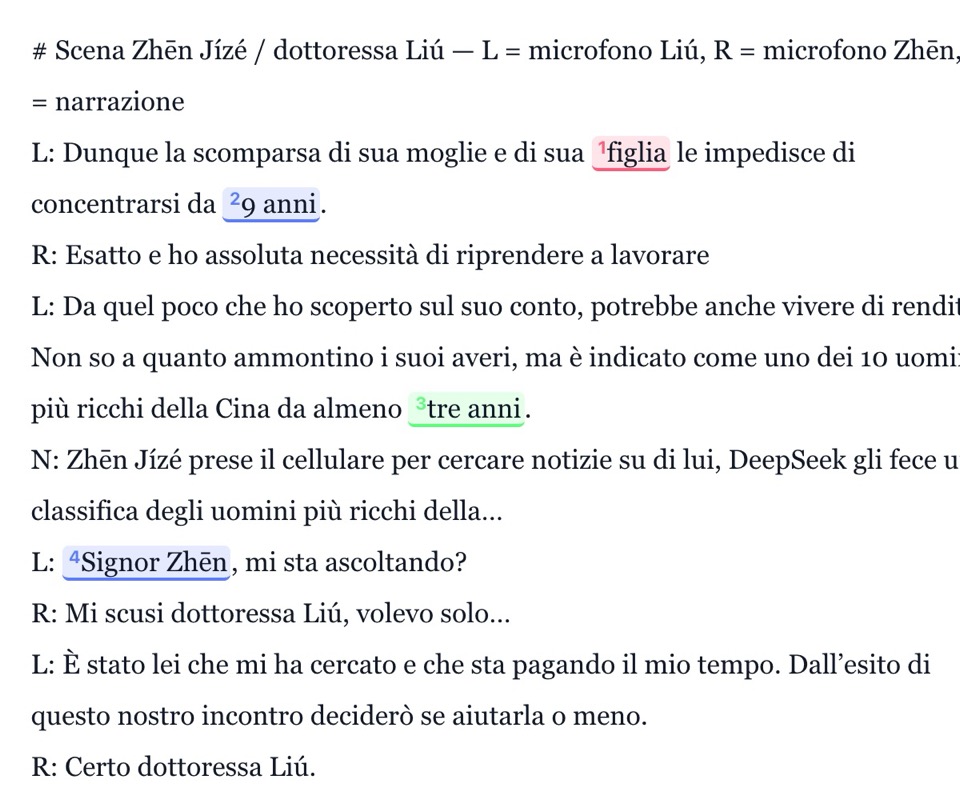
Mark the lines in the script
You load the PDF or Word file, or paste it, and select the words that fire a cue.
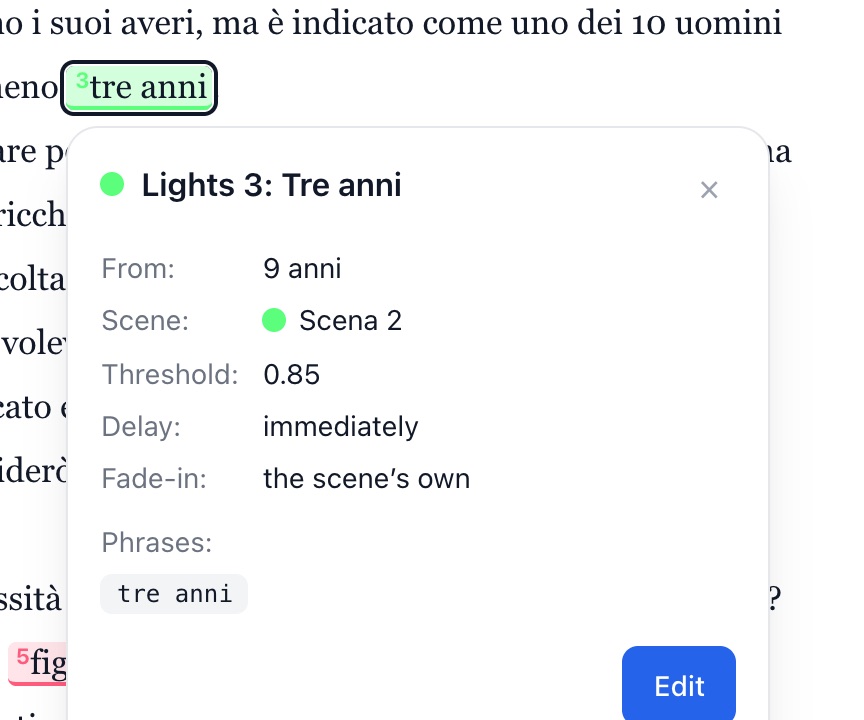
Choose what changes
For each line the lighting scene, the sound or the video, with delay and fade.
Try it before the performance
Type the lines into the simulation and see which cue would fire, and when.
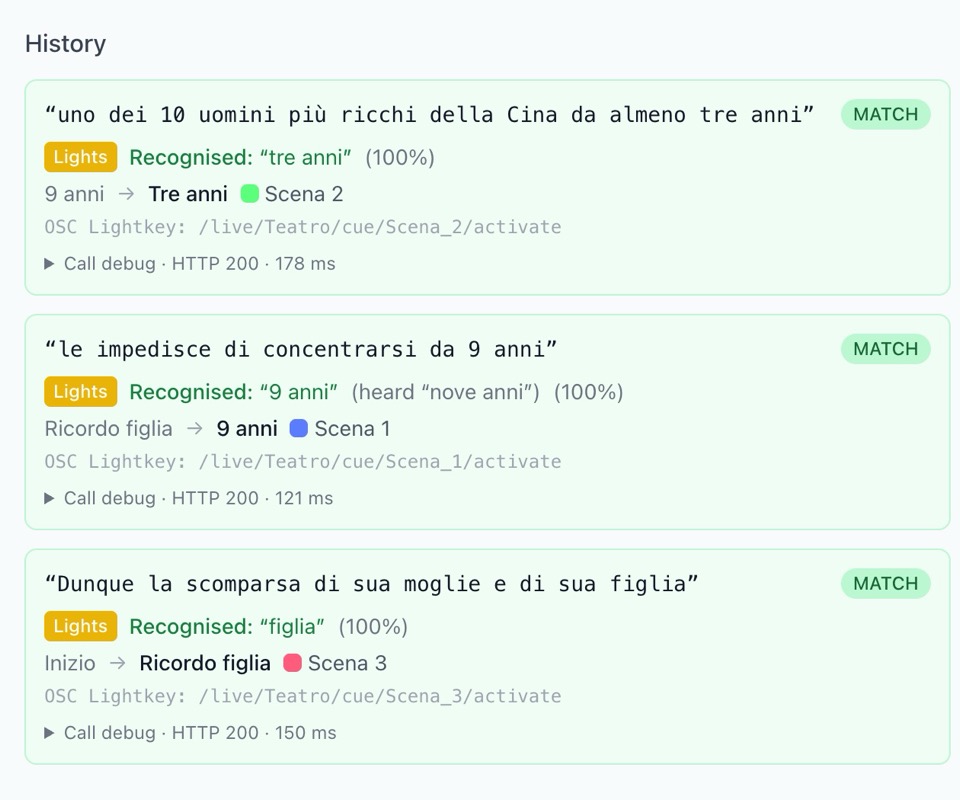
The control booth follows the actors
The microphone hears the lines on the computer itself, with no internet. At each marked line the cue fires by itself; when needed you fire it with GO, or stop everything with Panic.
- L«figlia»Ricordo figlia · LightsFired21:02
- L«9 anni»Nove anni · LightsFired21:02
- L«tre anni»Tre anni · LightsFired21:03
- V«classifica»Notizie · VideoFired21:03
- L«Signor Zhēn»Richiamo · LightsFired21:03
- L«figlia»Ricordo figlia 2 · LightsArmed—
- S«piscina»Acqua · SoundArmed—
- S«scimmie»Bagno · SoundArmed—
- L«fiducia»Casa · LightsArmed—
- L«sapere»Buio · LightsArmed—
The light follows the actor.
You mark the line in the script once: at every performance the cue fires when the actor says it, even if the pace changes.
Several lines per cue
The cue fires on the first one the actor says.
One microphone per actor
Each line can listen only to the microphone of whoever says it.
Delay and fade
Each cue can wait a few seconds and come up slowly.
Every line moves four departments. Lights, sound, video and surtitles from the same script.
Drives the lights over DMX
Art-Net, sACN or a USB interface, no console needed. Each scene remembers the level of every light.
Plays sound and music
Every sound has its own volume over time, with fade-ins and fade-outs.
- Light rain started−6 dB, 3 s fade-in
- Distant thunderOnce only, on “tre anni”
- Closing music queued8 s fade-out
Projects video and images
Full screen on the second display, without QLab and never on the control booth’s screen.
-
Mare di notte.mp4 Video
-
Alba.png Image
-
Titoli.mov Video
-
Pioggia.wav Sound
-
Pianta.png Image
-
Applausi.wav Sound
-
Finale.mp4 Video
-
Tuono.wav Sound
Shows translated surtitles
Cards from the script, translated offline or with Claude. On stage they move on with the actors.
- Italiano, 48 cards
- English, 48 of 48 checked
- Deutsch, 48 of 48 checked
- Français, draft by Claude
- Español, offline draft
Prices
Free for lighting, with no expiry and no account. A licence adds channels and departments, for life or yearly.
Free
€0.00 for ever
Download- Lighting, up to 16 DMX channels
- Lightkey, OSC and MIDI for lighting
- Speech recognition with no internet
- The scene desk, with sequences and effects
- The simulation and the control booth, from a tablet too
- The first setup of each script
With a licence
Soon
See prices- From 64 channels to every DMX universe
- Sound and video, from the program or from QLab
- Surtitles in the audience’s languages
- More setups and the venue archive
- Extra functions one by one, or all together
- To move up a tier you pay only the difference
On its own or with Lightkey and QLab
Each theatre chooses where every department goes: to the program’s own engine or to the programs it already uses, over OSC. The script stays the same.
Lightkey and QLab over OSC
Consoles over OSC or MIDI
DMX on Art-Net, sACN or USB
Questions
Do I need the internet during the show?
No. Speech recognition runs on the computer: you only need the internet to download the program and the language model.
What does the free version include?
The whole program for lighting: 16 DMX channels, or Lightkey, OSC and MIDI, and the first setup of each script. More channels, sound, video, surtitles and more setups come with a licence.
Which DMX interfaces does it use?
Art-Net and sACN over the network, Enttec DMX USB Pro and Open DMX USB over USB.
In which languages can the actors perform?
Italian, English, German, French and Spanish, with one speech model per language.
What if an actor skips a line?
The cue waits for its line. From the control booth you fire it with GO, jump further ahead in the script or stop everything with Panic.