DMX channels
This is where you say which lights there are and on which channels. You open it with DMX channels from a venue's card, or with Open the channel grid from the Allestimenti (Setups) page.
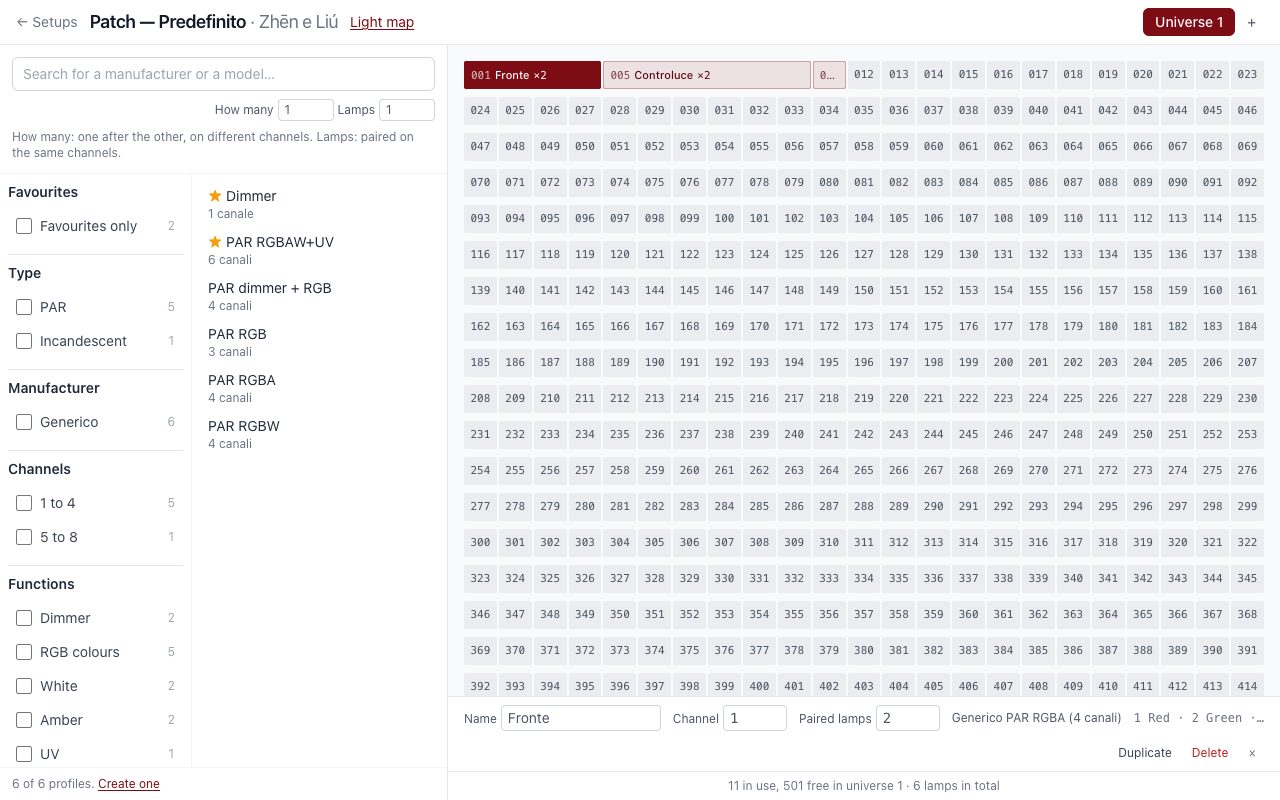
On the left is the catalogue of models, with the same search as the lighting fixtures. Advanced search, next to the box, opens the same filters: type, manufacturer, channels, functions, source and use. If you search for a mode, for example “8 channels”, only those remain. On the right, the grid of the universe's 512 channels, which wraps where the window ends. The + button at the top adds a universe.
Models with the star come first, and the Favourites only filter keeps just those. You put the star on in the lighting fixtures.
Placing a light
- Find the model in the catalogue. If it's not there, create it.
- Drag it onto the channel it starts from, or click the model and then the channel.
A model with more than one mode opens with a click and shows its modes: choose the right one, then the channel. If you drag the whole model instead, when you let go the program asks which mode to use. The ones that don't fit from that channel can't be chosen.
As you move over the grid, green means it fits and red means it overlaps another light. The program won't save two lights on the same channels, with one exception: paired lamps.
On the grid, you move a light by dragging it. If you click it, its name, channel and lamps appear at the bottom, with Duplicate and Delete.
On the real fixture, set the same address you see in the grid: it's the fixture's first channel.
Quanti and Fari
Above the catalogue there are two numbers, not to be confused:
| Number | What it does | Example |
|---|---|---|
| How many | Several lights one after the other, on different channels | 3 PARs with 4 channels: 1–4, 5–8, 9–12 |
| Lamps | Several paired lights on the same channels | 2 PARs connected to the same dimmer |
Paired lamps
One DMX channel can control several lights together: two incandescent PARs on the same dimmer, or several LED PARs linked to each other. In the grid they are a single block, with the number next to the name, for example ×2. You change the number at the bottom, in Paired lamps.
- On the map, each lamp appears on its own, with its own position, aiming and design.
- In the scenes they are a single control, because they receive the same signal.
- If you lower the number, the last ones disappear, along with their position and design.
If something doesn't light up
| What you see | What to check |
|---|---|
| The fixture stays off, with no errors | The display (A001, not AU or Snd), the cable on DMX IN, the address, the mode |
| Wrong colours, or the fixture next to it lights up | The address on the fixture, or a model in another mode |
A USB port carries only one universe: to get more, you need the network.